Developer’s Guide
This chapter contains guides about:
- How to run applications on OTBN from a host CPU.
- How to write OTBN applications and make best use of the OTBN ISA.
- How to develop OTBN by using the simulator as well as the hardware simulator.
- Some details about OTBN’s Device Interface Functions. This is part of the documentation is work in progress.
Running applications on OTBN
The high-level structure of how to run an OTBN program was described in Introduction to OTBN. The following list gives more detail of the steps that the host processor must follow.
- Optional: Initialise
LOAD_CHECKSUM. - Write the OTBN application binary to
IMEM, starting at address 0. - Optional: Write constants and input arguments, as mandated by the calling convention of the loaded application, to the DMEM accessible through the
DMEMwindow. - Optional: Read back
LOAD_CHECKSUMand perform an integrity check. - Start the operation on OTBN by issuing the
EXECUTEcommand. Now neither data nor instruction memory may be accessed from the host CPU. After it has been started the OTBN application runs to completion without further interaction with the host. - Wait for the operation to complete (see below). As soon as the OTBN operation has completed the data and instruction memories can be accessed again from the host CPU.
- Check if the operation was successful by reading the
ERR_BITSregister. - Optional: Retrieve results by reading
DMEM, as mandated by the calling convention of the loaded application.
OTBN applications are run to completion.
The host CPU can determine if an application has completed by either polling STATUS or listening for an interrupt.
- To poll for a completed operation, software should repeatedly read the
STATUSregister. The operation is complete ifSTATUSisIDLEorLOCKED, otherwise the operation is in progress. WhenSTATUShas becomeLOCKEDa fatal error has occurred and OTBN must be reset to perform further operations. - Alternatively, software can listen for the
doneinterrupt to determine if the operation has completed. The standard sequence of working with interrupts has to be followed, i.e. the interrupt has to be enabled, an interrupt service routine has to be registered, etc. The DIF contains helpers to do so conveniently.
Note: This operation sequence only covers functional aspects. Depending on the application additional steps might be necessary, such as deleting secrets from the memories.
Writing OTBN applications
OTBN applications are (small) pieces of software written in OTBN assembly.
The full instruction set is described in the ISA manual, and example software is available in the sw/otbn directory of the OpenTitan source tree.
The following subsections give insights into the build tools as well as providing some examples how to make best use of the ISA.
See the developing section for how to run programs on the simulator or with the RTL simulation.
For specific formatting and secure coding guidelines, see the OTBN style guide.
ISA specification
The instruction set is defined in machine readable form in data/insns.yml.
This is parsed by Python code in util/insn_yaml.py, which runs various basic checks on the data.
The binutils-based toolchain described below uses this information.
Other users include:
util/yaml_to_doc.py: Generates a Markdown snippet which is included in the ISA manual.dv/rig/otbn-rig: A random instruction generator for OTBN. See its README for further information.
Toolchain
OTBN comes with a toolchain consisting of an assembler, a linker, and helper tools such as objdump.
The following tools are available in hw/ip/otbn/util:
otbn_as.py: The OTBN assembler.otbn_ld.py: The OTBN linker.otbn_objdump.py: objdump for OTBN.
These tools are wrappers around a RISC-V binutils toolchain so one must be available.
The toolchain can be installed with the util/get-toolchain.py script.
Simply call the script from $REPO_TOP and make sure to select the correct architecture.
Other tools from the RV32 toolchain can be used directly, such as objcopy.
Assembler
The OTBN assembler is otbn_as.py and has the same command line interface as riscv32-unknown-elf-as.
The only difference in default flags is that otbn_as.py passes -mno-relax, telling the assembler not to request linker relaxation.
This is needed because one of these relaxations generates GP-relative loads, which assume x3 is treated as a global pointer (not true for OTBN code).
To assemble some code in foo.s to an ELF object called foo.o, run:
hw/ip/otbn/util/otbn_as.py -o foo.o foo.s
Linker
The OTBN linker is otbn_ld.py which is a thin wrapper around riscv32-unknown-elf-ld.
This wrapper supplies a default linker script that matches the OTBN memory layout.
This linker script creates .start, .text and .data output sections.
The .start and .text sections go to IMEM, with .start coming first.
The .data section goes to DMEM.
Since OTBN has a strict Harvard architecture with IMEM and DMEM both starting at address zero, the .start and the .data sections will both start at VMA zero.
The instruction and data segments have distinct LMAs (for addresses, see the IMEM and DMEM windows at hw/ip/otbn/data/otbn.hjson).
Since the entry point for OTBN is always address zero, the entry vector should be the one and only thing in the .start section.
To achieve that, put your entry point (and nothing else) in the .text.start input section like this:
.section .text.start
  jal x0, main

.text
  ...
This ensures that even if there are multiple objects being linked together, the intended entry point will appear in the right place.
To link ELF object files to an OTBN ELF binary, run
hw/ip/otbn/util/otbn_ld.py -o foo foo0.o foo1.o foo2.o
Objdump
The OTBN objdump is otbn_objdump.py which wraps riscv32-unknown-elf-objdump.
This wrapper enables the disassembly of the custom OTBN instructions when run with the -d flag.
To disassemble the ELF binary linked in the previous section, run
hw/ip/otbn/util/otbn_objdump.py -d foo
Passing of data between the host CPU and OTBN
Passing data between the host CPU and OTBN is done through the first part of the data memory (DMEM, see otbn.hjson for the size of the visible DMEM range). No standard or required calling convention exists, every application is free to pass data in and out of OTBN in whatever format it finds convenient. All data passing must be done when OTBN is idle; otherwise both the instruction and the data memory are inaccessible from the host CPU.
Returning from an application
The software running on OTBN signals completion by executing the ECALL instruction.
Once OTBN has executed the ECALL instruction, the following things happen:
- No more instructions are fetched or executed.
- A secure wipe of internal state is performed.
- The
ERR_BITSregister is set to 0, indicating a successful operation. - The current operation is marked as complete by setting
INTR_STATE.doneand clearingSTATUS.
The first part of DMEM can be used to pass data back to the host processor, e.g. a “return value” or an “exit code”. Refer to the section Passing of data between the host CPU and OTBN for more information.
Using hardware loops
OTBN provides two hardware loop instructions: LOOP and LOOPI.
Loop nesting
OTBN permits loop nesting and branches and jumps inside loops. However, it doesn’t have support for early termination of loops: there’s no way to pop an entry from the loop stack without executing the last instruction of the loop the correct number of times. It can also only pop one level of the loop stack per instruction.
To avoid polluting the loop stack and avoid surprising behavior, the programmer must ensure that:
- Even if there are branches and jumps within a loop body, the final instruction of the loop body gets executed exactly once per iteration.
- Nested loops have distinct end addresses.
- The end instruction of an outer loop is not executed before an inner loop finishes.
OTBN does not detect these conditions being violated, so no error will be signaled should they occur.
(Note indentation in the code examples is for clarity and has no functional impact.)
The following loops are well nested:
LOOP x2, 3
  LOOP x3, 1
    ADDI x4, x4, 1
  # The NOP ensures that the outer and inner loops end on different instructions
  NOP

# Both inner and outer loops call some_fn, which returns to
# the body of the loop
LOOP x2, 5
  JAL x1, some_fn
  LOOP x3, 2
    JAL x1, some_fn
    ADDI x4, x4, 1
  NOP

# Control flow leaves the immediate body of the outer loop but eventually
# returns to it
LOOP x2, 4
  BEQ x4, x5, some_label
branch_back:
  LOOP x3, 1
    ADDI x6, x6, 1
  NOP

some_label:
  ...
  JAL x0, branch_back
The following loops are not well nested:
# Both loops end on the same instruction
LOOP x2, 2
  LOOP x3, 1
    ADDI x4, x4, 1

# Inner loop jumps into outer loop body (executing the outer loop end
# instruction before the inner loop has finished)
LOOP x2, 5
  LOOP x3, 3
    ADDI x4, x4 ,1
    BEQ  x4, x5, outer_body
    ADD  x6, x7, x8
outer_body:
  SUBI  x9, x9, 1
Multiplying big numbers
OTBN’s BN.MULQACC, BN.MULQACC.SO, and BN.MULQACC.WO instructions provide a convenient way to implement big number multiplications.
All of them do roughly the same thing:
- they perform a 64x64-bit multiplication (the
qinmulqaccis for “quarter-word”) - they accumulate the 128-bit product into a special 256-bit special accumulator register called
ACC
The .wo variant copies the entire accumulator value to a destination WDR.
The .so variant writes the low 128 bits of the accumulator into a WDR and then shifts the accumulator 128 bits.
All variants accept an offset argument, so the product can be added to the accumulator with a shift of 0, 64, 128, or 192 bits.
Instructions with a .z suffix accumulate from zero, rather than the previous value of the accumulator.
The following instruction sequence multiplies the lower half of w0 by the upper half of w0 placing the result in w1.
BN.MULQACC.Z      w0.0, w0.2, 0
BN.MULQACC        w0.0, w0.3, 64
BN.MULQACC        w0.1, w0.2, 64
BN.MULQACC.WO w1, w0.1, w0.3, 128
And this is a 256x256-bit multiplication of wide registers w2 and w4:
bn.mulqacc.z          w2.0, w4.0, 0     /* a0b0 */
bn.mulqacc            w2.0, w4.1, 64    /* a0b1 */
bn.mulqacc.so  w10.L, w2.1, w4.0, 64    /* a1b0 */
bn.mulqacc            w2.0, w4.2, 0     /* a0b2 */
bn.mulqacc            w2.1, w4.1, 0     /* a1b1 */
bn.mulqacc            w2.2, w4.0, 0     /* a2b0 */
bn.mulqacc            w2.0, w4.3, 64    /* a0b3 */
bn.mulqacc            w2.1, w4.2, 64    /* a1b2 */
bn.mulqacc            w2.2, w4.1, 64    /* a2b1 */
bn.mulqacc.so  w10.U, w2.3, w4.0, 64    /* a3b0 */
bn.mulqacc            w2.1, w4.3, 0     /* a1b3 */
bn.mulqacc            w2.2, w4.2, 0     /* a2b2 */
bn.mulqacc            w2.3, w4.1, 0     /* a3b1 */
bn.mulqacc            w2.2, w4.3, 64    /* a2b3 */
bn.mulqacc            w2.3, w4.2, 64    /* a3b2 */
bn.mulqacc.wo    w11, w2.3, w4.3, 128   /* a3b3 */
In algebraic terms with 64-bit limbs, we are computing: \[ \begin{aligned} a * b &= a_0b_0 \\ &+ 2^{64}a_0b_1 + 2^{64}a_1b_0 \\ &+ 2^{128}a_0b_2 + 2^{128}a_1b_1 + 2^{128}a_2b_0 \\ &+ 2^{192}a_0b_3 + 2^{192}a_1b_2 + 2^{192}a_2b_1 + 2^{192}a_3b_0 \\ &+ 2^{256}a_1b_3 + 2^{256}a_2b_2 + 2^{256}a_3b_1 \\ &+ 2^{320}a_2b_3 + 2^{320}a_2b_3 \\ &+ 2^{384}a_3b_3 \end{aligned} \]
We use the shift arguments to place partial products like \(a_0b_1\) at the right offset, and then use half-word writebacks so that we can safely continue adding to the accumulator without overflowing.
Code snippets giving examples of 256x256 and 384x384 multiplies can be found in sw/otbn/code-snippets/mul256.s and sw/otbn/code-snippets/mul384.s.
There are significant performance benefits in elliptic-curve cryptography and RSA from speeding up bignum multiplication, since it is by far the most time-consuming operation in those domains.
For example, 66% of instructions executed on OTBN during an ECDSA-P256 signature generation are some form of bn.mulqacc.
The proportion is similarly high across other ECC and RSA computations.
See the performance section for exact benchmarks.
Modulo computations
OTBN has a special MOD WSR that holds a modulus (up to 256 bits).
The instructions BN.ADDM and BN.SUBM as well as their vectorized counterparts BN.ADDVM and BN.SUBVM perform addition and subtraction over that modulus.
This is especially useful for elliptic-curve cryptography such as ECDSA-P256 and Ed25519, where bn.addm replaces a common “add and then conditionally subtract the modulus in constant-time if the sum is greater” pattern.
The vectorized instructions are useful for PQC algorithms.
Montgomery multiplication
A key building block for polynomial arithmetic in PQC algorithms such as ML-DSA and ML-KEM, is to compute a modular multiplication.
Such multiplications are usually computationally expensive as it requires division to reduce.
The Montgomery multiplication avoids expensive division by the modulus by working in a scaled representation.
An operand a in Montgomery form is a * 2^d mod q, where d is the element bit-width (32 in OTBNs case).
The instruction then computes:
r = a * b * 2^(-d) mod q
This can be implemented in hardware using multiplications, additions and shift operations only (see description of BN.MULVM for more details).
The BN.MULVM instruction performs such a Montgomery multiplication over a vector of 32-bit elements. It requires that the MOD WSR must be initialised with:
MOD[31:0]: the modulusqMOD[63:32]: the Montgomery constantmu = (-q)^(-1) mod 2^d
To optimize area, the final conditional subtraction step of the Montgomery algorithm is not implemented in hardware.
The result is therefore in [0, 2q[ rather than [0, q[.
To reduce back to [0, q[, a conditional subtraction with q can be performed with BN.ADDVM using a zero source operand like this:
bn.xor       w31, w31, w31 /* zero w31 */
bn.mulvm.8S  w2,  w0,  w1
bn.addvm.8S  w2,  w2,  w31
When chaining multiplications the conditional subtraction can be postponed to the last step,
provided the inputs stay within [0, 2q[ and q < 2^d / 4 holds.
For a more concrete example how to use BN.MULVM see sw/otbn/crypto/mldsa87/mldsa87_ntt.s.
Concatenate-and-shift
OTBN’s BN.RSHI instruction concatenates two wide registers and then shifts them together.
For example, bn.rshi w3, w1, w2 >> 63 would do something like in the below diagram:
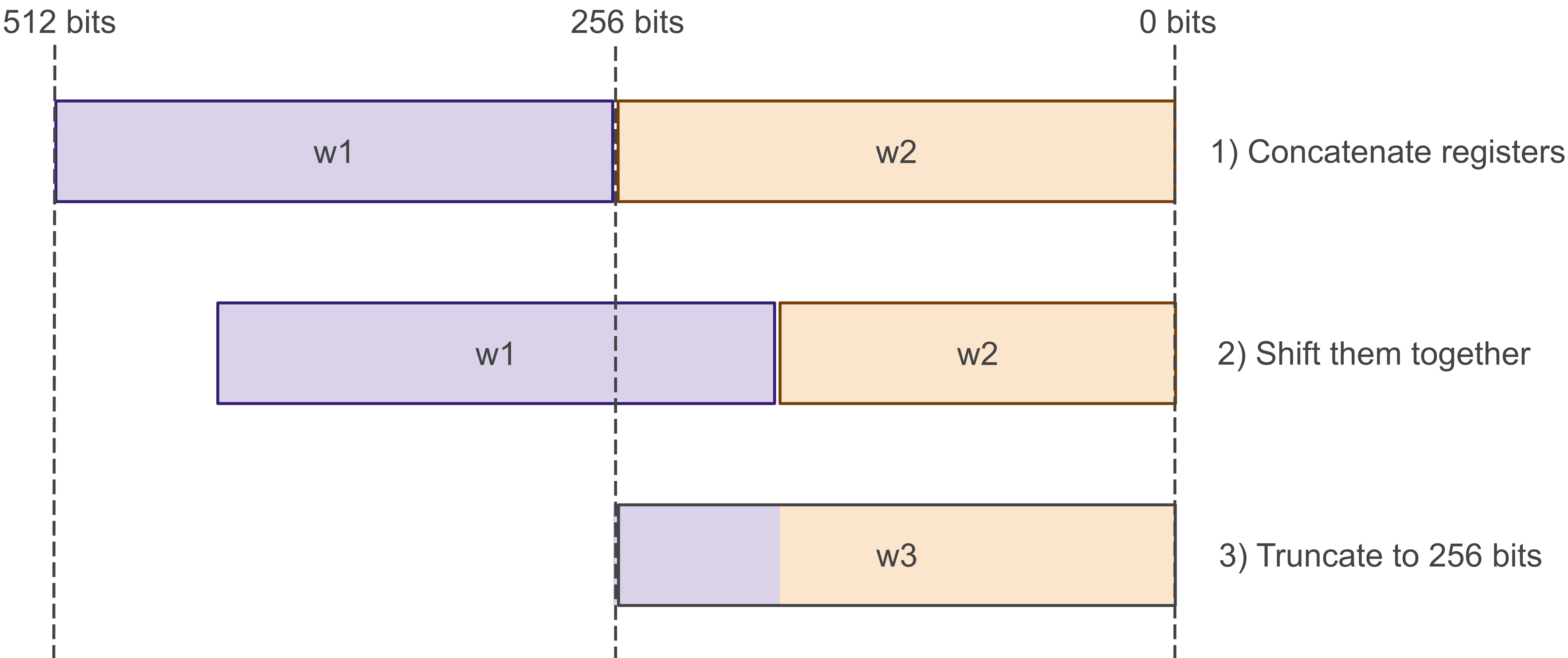
This is very useful for bignum arithmetic, when the two registers might represent two adjacent parts of a huge number, or for selecting only certain parts of a bignum.
Note that bn.rshi can work as a more typical right-shift by setting the high register to 0, and as a left-shift by setting the low register to 0.
Shifted operands
Many bignum instructions on OTBN include a shift argument.
For example, to compute w1 + (w2 << 32), you can simply write:
bn.add w3, w1, w2 << 32
Similarly, you can shift-left:
bn.add w3, w1, w2 >> 32
This works on all binary arithmetic operators and also all bitwise operations. Specifically, that means the following instructions:
BN.ADD: addBN.ADDC: add with carryBN.SUB: subtractBN.SUBB: subtract with borrowBN.CMP: compareBN.CMPB: compare with borrowBN.AND: bitwise andBN.NOT: bitwise notBN.OR: bitwise orBN.XOR: bitwise xor
This shift argument makes manipulating sub-parts of words on OTBN concise and ergonomic. For example, here is how you can flip the endianness of each 32-bit word in a 256-bit word in 7 instructions (taken directly from our OTBN SHA-256 implementation):
/**
 * Flip the bytes in each 32-bit word of a 256-bit value.
 *
 * This routine runs in constant time.
 *
 * Flags: Flags have no meaning beyond the scope of this subroutine.
 *
 * @param[in,out]   w23: Wide register to flip (modified in-place).
 * @param[in]       w29: Byte-swap mask (0x000000ff, repeated 8x).
 *
 * clobbered registers: w23 to w27
 * clobbered flag groups: FG0
 */
bswap32_w23:
  /* Isolate each byte of each 32-bit word.
       w24 <= byte 0 of each word = a
       w25 <= byte 1 of each word = b
       w26 <= byte 2 of each word = c
       w27 <= byte 3 of each word = d */
  bn.and   w24, w29, w23
  bn.and   w25, w29, w23 >> 8
  bn.and   w26, w29, w23 >> 16
  bn.and   w27, w29, w23 >> 24

  /* Shift/or the bytes back in reversed order.
       w23 <= a || b || c || d */
  bn.or    w23, w25, w24 << 8
  bn.or    w23, w26, w23 << 8
  bn.or    w23, w27, w23 << 8
  ret
Packing and unpacking 24-bit element vectors
The vectorized subset of Bignum instructions enable SIMD computation on 32-bit elements.
However, some PQC algorithms operate on smaller values.
To optimize the memory footprint of such programs, vectors can be compressed and then be stored in memory in a compressed 24-bit format.
The bn.pack and bn.unpk instructions convert 32-bit vectors into a dense 24-bit representation and vice-versa as described in the ISA manual.
These packed vectors can then be stored in the memory as shown below.

To pack vectors one can use the following snippet:
/*
 * Assume we have 4 vectors with 8 32-bit elements currently in WDRs w0-w3
 * which we want to store in the packed format.
 * The color in the image corresponds to the WDRs as follows:
 * w0: Red vector
 * w1: Yellow vector
 * w2: Green vector
 * w3: Blue vector
 */

/* Pack the vectors into temporary WDRs */
bn.pack w10, w1, w0, 64
bn.pack w11, w2, w1, 128
bn.pack w12, w3, w2, 192

/* Store packed vectors to memory */
...
The inner workings of the bn.pack instruction are visualized in the following figure for the case of bn.pack w11, w2, w1, <shift>.
The two vectors are first converted in a dense format (192 bits each), then concatenated with additional zero bits.
Finally, the 512 bits are shifted to produce the marked 256 bits which are stored to the destination WDR.
This allows one to construct all the required packings.

The unpacking works by concatenating two 256-bit strings loaded from memory and shifting the desired bits to the lower 192 bits. These 192 bits are then expanded to 8x 32 bits by inserting zero bytes every 3 bytes.
/*
 * Load packed vectors from memory into WDRs w10-w12 such that:
 * w10 corresponds the 1st line in the first image
 * w11 corresponds the 2nd line in the first image
 * w12 corresponds the 3rd line in the first image
 */
...

/* Unpack vectors */
bn.unpk w0, w11, w10, 0   /* unpack the red vector to w0 */
bn.unpk w1, w11, w10, 192 /* unpack the yellow vector to w1 */
bn.unpk w2, w12, w11, 128 /* unpack the green vector to w2 */
bn.unpk w3, wXX, w12, 64  /* unpack the blue vector to w3, wXX represents that any WDR can be used */
Transposing vector elements
To efficiently shuffle vectors, one can use the bn.trn1 and bn.trn2 instructions.
These instructions reorder the vector elements as illustrated in the image below for bn.trn1.4d and bn.trn2.4d.
- The
bn.trn1 wrd, wrs1, wrs2instruction places even-indexed vector elements fromwrs1into even-indexed elements ofwrdand even-indexed vector elements fromwrs2are placed into odd-indexed elements ofwrd. - The
bn.trn2 wrd, wrs1, wrs2instruction places odd-indexed vector elements fromwrs1into even-indexed elements ofwrdand odd-indexed vector elements fromwrs2are placed into odd-indexed elements ofwrd.

URND context saving and restoring
The URND values are produced by a PRNG which can be stopped to save and restore its state. This allows OTBN software to produce the same stream of pseudo random numbers multiple times.
The following is an example how to save and restore the URND context.
/* Check that URND_CTRL is enabled */
addi x2, x0, URND_CTRL_ENABLED /* URND_CTRL_ENABLED is a bit mask */
csrrw x3, URND_STATUS, x0
andi x3, x3, x2
bne x0, x3, _urnd_ctrl_enabled
unimp /* Crash or handle error. */

_urnd_ctrl_enabled:
/* Prepare addresses and registers to set the control bits.
 * Here URND_STOP etc represent the bit index for these commands.
 */
addi x3, x0, URND_STOP
addi x4, x0, URND_START
addi x5, x0, URND_RESTORE

/* Stop the PRNG and extract the current state. Then restart it to do some work.
 * Note: While stopped a read of URND, a bn.mulv(m) instruction, or a MAI
 * execution will enforce an advance of the PRNG.
 */
csrrs x0, URND_CTRL, x3
bn.wsrr w0, URND_STATE
csrrs x0, URND_CTRL, x4

/* Do some work using the URND stream */
bn.wsrr w10, URND
...

/* To restore the stream do:
 * - First stop the PRNG and save the current state. For security reasons it is
 *   recommended that the SW part afterwards does not use the same stream of
 *   URND values as the code above. Note that the PRNG output is also used for
 *   masking of certain secure operations like the MAI.
 * - Restore the PRNG with the saved state.
 * - Reuse the URND stream.
 * - Restore the PRNG again.
 */
bn.lid x0, 0(x10)
csrrs x0, URND_CTRL, x3
bn.wsrr w1, URND_STATE

/* Restoring happens in 32-bit chunks. Request a restore operation whilst the
 * PRNG is stopped.
 */
csrrs x0, URND_CTRL, x5

/* Then write the `roundup(BiviumStateWdith / 32) = roundup(177 / 32) = 6`
 * 32-bit state words to the lowest 32 bits of URND_STATE. The upper bits are
 * ignored when writing to URND_STATE. So are the unused bits of the last state
 * word.
 */
loopi, 6, 2
  bn.wsrw URND_STATE, w0
  bn.rshi w0, w31, w0 >> 32

/* The PRNG can now resume. */
csrrs x0, URND_CTRL, x4

/* Do some work using the same URND stream */
bn.wsrr w10, URND
...

/* Restore the URND state again */
<The same as above just with the 2nd saved state.>
Compressing shared variables with URND context restoration
How this works is as follows: Assume there are two boolean shares s0 and s1 of a 256-bit secret secret such that
secret = s_0 ^ s_1
Now we want to a new s such that:
secret = s_0 ^ s_1 = s ^ urnd
i.e., the URND output is equal to one of the shares.
This means
s = (s_0 ^ urnd) ^ s_1
i.e., one can compute the new s by remasking s_0 with urnd and then adding s_1.
This will not leak the secret.
Now only s (256 bits) and urnd_state (179 bits) must be stored instead of s_0 and s_1.
And of course, this can be applied to secrets which are much wider than 256 bits.
Say,
secret = [s0 s1 s2 s3 s4 s5 s6] ^ [urnd0 rund1 urnd2 urnd3 urnd4 urnd5 urnd6]
And because subsequent urnd outputs are fully defined by the original urnd_state and the order in which they are drawn, all that needs to be stored is the original urnd_state and the different s0 to s6.
So in this example only 7 * 256 + 179 bits must be stored instead of 14 * 256 bits.
For large secrets, this can can effectively half the number of bits required for storage. Note that the same approach can be used to go from 3 to 2 shares.
An example program
This is an entire, standalone OTBN program that computes (a + b << 16) mod m, where a, b and m are all up to 256 bits (and a, b < m):
.section .text.start
main:
  /* Load the operands.
       w10 <= dmem[input_a]
       w11 <= dmem[input_b] */
  la        x2, input_a
  li        x3, 10
  bn.lid    x3++, 0(x2)
  la        x2, input_b
  bn.lid    x3++, 0(x2)

  /* Load the modulus and write it to the MOD register.
       MOD <= dmem[input_m] */
  la        x2, input_m
  bn.lid    x3, 0(x2)
  bn.wsrw   0x0, w12 /* special register 0 = MOD */

  /* Compute (b << 16) mod m by repeatedly doubling b.

     Loop invariants at start of loop (i=0..15):
       w11 = (b << i) mod m */
  loopi     16, 1
    bn.addm   w11, w11, w22

  /* Add to the first operand.
       w10 <= (w10 + w11) mod m = (a + b << 16) mod m */
  bn.addm   w10, w10, w11

  /* Store the result. */
  la        x2, result
  li        x3, 10
  bn.sid    x3, 0(x2)

  /* End the program. */
  ecall

.bss

/* Input buffer for the first operand, a (256 bits). */
input_a:
.zero 32

/* Input buffer for the second operand, b (256 bits). */
input_b:
.zero 32

/* Input buffer for the modulus (256 bits). */
input_m:
.zero 32

/* Output buffer. */
result:
.zero 32
Some notes to help explain the code above:
- Execution always starts from the label
.text.start lais “load address” from the RISC-V instruction setliis “load immediate”, a pseudo-instruction that loads a small constantbn.lidis a wide-register load instruction- The first argument is a small register whose value points to a wide register: for example, if the small register’s value is 5 we will load to wide register
w5 - Adding a
++on the pointer register increments it by 1, so you can easily load to consecutive wide registers (e.g. w3, w4, w5, …) - It is also possible to add a
++on the register that holds the address; in this case the value will be incremented by 32 so it points to the end of the load and you can easily load contiguous stretches of DMEM
- The first argument is a small register whose value points to a wide register: for example, if the small register’s value is 5 we will load to wide register
bn.sidis a wide-register store instruction with syntax similar tobn.lid- The first argument to
loopiis the number of iterations, and the second is the number of instructions in the loop body .bssmarks data memory that is not initialized; the program would still work if we used.data, but the binary would be bigger because Ibex would store a bunch of placeholder zeroes
To see all current OTBN programs from the OpenTitan codebase, see the sw/otbn directory.
The crypto/ subdirectory contains code we use in production, while the code-snippets subdirectory contains small example programs.
Masking accelerator interface and KMAC interface example
See sw/otbn/mai/mai_test.s for an example how to use the MAI.
See sw/otbn/kmac/kmac_tlt_test.s for an example how to use the KMAC interface.
Developing OTBN
OTBN applications as well as RTL changes can be tested by using a python simulator or a RTL co-simulation.
Run the ISS (Instruction Set Simulator)
The quickest way to run an OTBN-only program is to use the standalone Python simulator.
First, generate a .elf. file, then run:
$ hw/ip/otbn/dv/otbnsim/standalone.py path/to/prog.elf
The final DMEM can be dumped with the --dmem-dump argument.
To see an instruction trace, pass the --verbose flag.
There is also dv/otbnsim/stepped.py which is controlled via CLI commands and is used by the UVM tests.
It requires to send detailed commands to step the model and handle state updates etc. and is probably not very convenient for user-based command-line use.
Test the ISS
The ISS has a simple test suite, which runs various instructions and makes sure they behave as expected. See the simulator page for more details.
Run the standalone RTL simulation
A standalone environment to run OTBN alone in Verilator is included.
Build it with fusesoc as follows:
fusesoc --cores-root=. run --target=sim --setup --build \
  --mapping=lowrisc:prim_generic:all:0.1 lowrisc:ip:otbn_top_sim \
  --make_options="-j$(nproc)"
It includes functionality to set the initial Dmem and Imem contents from a .elf file.
The start address is hard coded to 0.
Modify the ImemStartAddr parameter in ./dv/verilator/otbn_top_sim.sv to change this.
A .elf can be loaded and run as follows:
./build/lowrisc_ip_otbn_top_sim_0.1/sim-verilator/Votbn_top_sim \
  --load-elf=prog_bin/prog.elf
The simulation automatically halts on an ecall instruction and prints the final register values.
The ISS is run in parallel and the final register and memory state will be cross-checked.
Tracing functionality is available in the Votbn_top_sim binary.
To obtain a full .fst wave trace pass the -t flag.
To get an instruction level trace pass the --otbn-trace-file=trace.log argument.
The instruction trace format is documented in hw/ip/otbn/dv/tracer.
To run several auto-generated binaries against the Verilated RTL, use the script at dv/verilator/run-some.py.
For example,
hw/ip/otbn/dv/verilator/run-some.py --size=1500 --count=50 X
will generate and run 50 binaries, each of which will execute up to 1500 instructions when run.
The generated binaries, a Verilated model and the output from running them can all be found in the directory called X.
Run the smoke test
A smoke test which exercises some functionality of OTBN can be found, together with its expected outputs (in the form of final register values), in
./hw/ip/otbn/dv/smoke.
The test can be run using a script.
hw/ip/otbn/dv/smoke/run_smoke.sh
This will build the standalone simulation, build the smoke test binary, run it and check the results are as expected.
The vectorized bignum instructions can be smoke-tested by adding the ‘vectorized’ argument:
hw/ip/otbn/dv/smoke/run_smoke.sh vectorized
Device Interface Functions (DIFs)
A higher-level driver for the OTBN block is available at sw/device/lib/runtime/otbn.h.
Another driver for OTBN is part of the silicon creator code at sw/device/silicon_creator/lib/drivers/otbn.h.