Theory of Operation
Block Diagram
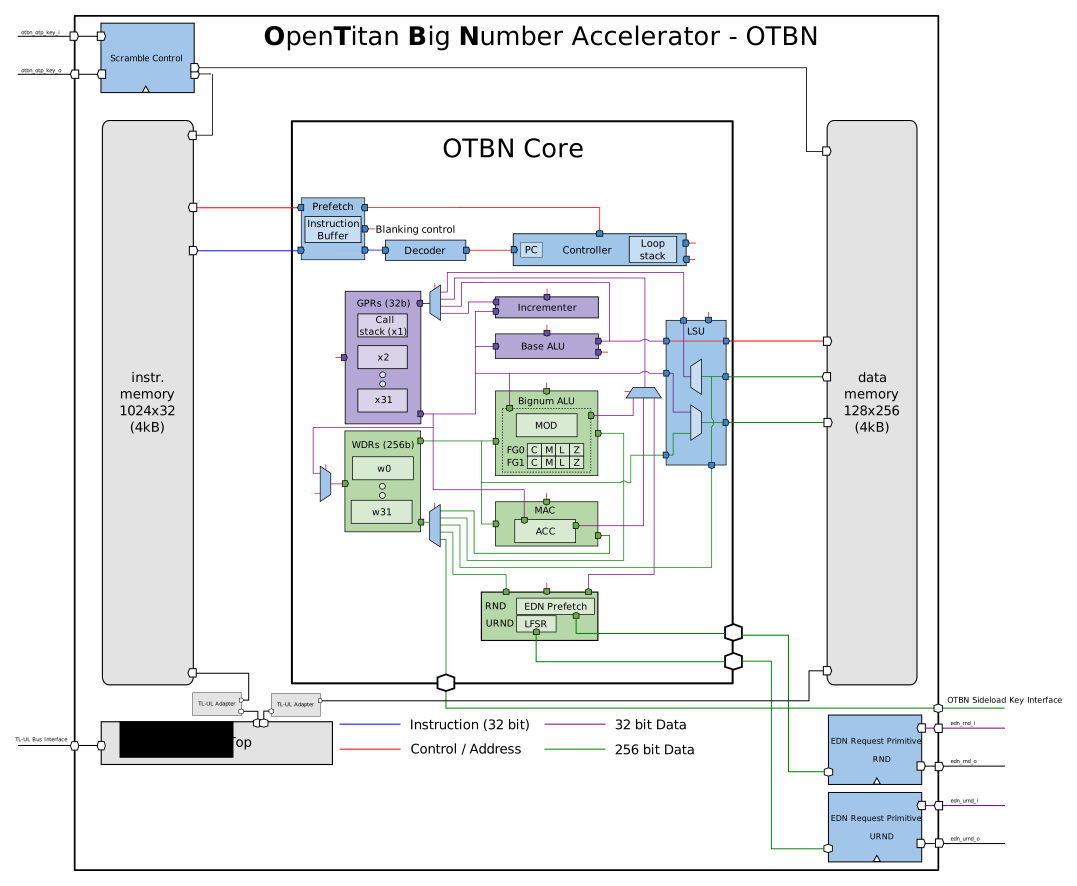
Design Details
Memories
The OTBN processor core has access to two dedicated memories: an instruction memory (IMEM), and a data memory (DMEM). The IMEM is 16 KiB, the DMEM is 32 KiB.
The memory layout follows the Harvard architecture. Both memories are byte-addressed, with addresses starting at 0.
The instruction memory (IMEM) is 32b wide and provides the instruction stream to the OTBN processor. It cannot be read from or written to by user code through load or store instructions.
The data memory (DMEM) is 256b wide and read-write accessible from the base and big number instruction subsets of the OTBN processor core.
There are four instructions that can access data memory.
In the base instruction subset, there are LW (load word) and SW (store word).
These access 32b-aligned 32b words.
In the big number instruction subset, there are BN.LID (load indirect) and BN.SID (store indirect).
These access 256b-aligned 256b words.
Both memories can be accessed through OTBN’s register interface (DMEM and IMEM).
All memory accesses through the register interface must be word-aligned 32b word accesses.
When OTBN is idle, both memories are accessible through the register interface.
When OTBN is paused by a WFI instruction, only the DMEM is unlocked and accessible, while the IMEM remains locked.
Note that pausing is only possible when the WFI instruction is enabled in the CTRL register.
For any memory that is not accessible in the current state, reads return zero and writes have no effect.
Furthermore, an access to such an inaccessible memory will cause OTBN to generate a fatal error with code ILLEGAL_BUS_ACCESS, unless OTBN is locked.
A host processor can check the current state by reading the STATUS register.
The underlying memories used to implement the IMEM and DMEM may not grant all access requests (see Memory Scrambling for details).
A request won’t be granted if new scrambling keys have been requested for the memory that aren’t yet available.
Functionally it should be impossible for either OTBN or a host processor to make a memory request whilst new scrambling keys are unavailable.
OTBN is in the busy state whilst keys are requested so OTBN will not execute any programs and a host processor access will generated an ILLEGAL_BUS_ACCESS fatal error.
Should a request not be granted due to a fault, a BAD_INTERNAL_STATE fatal error will be raised.
Although the DMEM is 32kiB, only the first 16kiB (at addresses 0x0 to 0x3fff) is visible through the register interface.
This is to allow OTBN applications to store sensitive information in the other 16kiB, making it harder for that information to leak back to Ibex.
Each memory write through the register interface updates a checksum. See the Memory Load Integrity section for more details.
Instruction Prefetch
OTBN employs an instruction prefetch stage to enable pre-decoding of instructions to enable the blanking SCA hardening measure. Its operation is entirely transparent to software. It does not speculate and will only prefetch where the next instruction address can be known. This results in a stall cycle for all conditional branches and jumps as the result is neither predicted nor known ahead of time. Instruction bits held in the prefetch buffer are unscrambled but use the integrity protection described in Data Integrity Protection.
Random Numbers
OTBN is connected to the Entropy Distribution Network (EDN) which can provide random numbers via the RND and URND CSRs and WSRs.
RND provides bits taken directly from the EDN connected via edn_rnd.
The EDN interface provides 32b of entropy per transaction and comes from a different clock domain to the OTBN core.
A FIFO is used to synchronize the incoming package to the OTBN clock domain.
Synchronized packages are then set starting from bottom up to a single WLEN value of 256b.
In order to service a single EDN request, a total of 8 transactions are required from EDN interface.
The RND CSR and WSR take their bits from the same source.
A read from the RND CSR returns the bottom 32b; the other 192b are discarded.
On a read from the RND CSR or WSR, OTBN will stall while it waits for data.
It will resume execution on the cycle after it receives the final word of data from the EDN.
As an EDN request can take time, RND is backed by a single-entry cache containing the result of the most recent EDN request in OTBN core level.
Writing any value to the RND_PREFETCH CSR initiates a prefetch.
This requests data from the EDN, storing it in the cache, and can hide the EDN latency.
Writes to RND_PREFETCH will be ignored whilst a prefetch is in progress or when the cache is already full.
If the cache is full, a read from RND returns immediately with the contents of the cache, which is then emptied.
If the cache is not full, a read from RND will block as described above until OTBN receives the final word of data from the EDN.
OTBN discards any data that is in the cache at the start of an operation. If there is still a pending prefetch when an OTBN operation starts, the results of the prefetch will also discarded.
URND provides bits from a local Bivium PRNG within OTBN; reads from it never stall.
This PRNG is seeded once from the EDN connected via edn_urnd when OTBN starts execution.
Each new execution of OTBN will reseed the URND PRNG.
In normal operation, the PRNG state is advanced every cycle when OTBN is running.
OTBN SW can stop and restore the PRNG via the URND control interface.
See the section below.
URND is also used by certain hardware parts to mask circuits and destroy any data during a secure wipe.
To provide URND as a glitch free signal to all its consumers, the URND value is the registered version of the PRNG output.
Due to this, the URND value lacks one cycle behind the PRNG output.
There is also a permutation based on a netlist secret to further obfuscate the state of the PRNG.
                +--------+
                | State  |
   +------------| Update |<-+
   |            | (comb) |  |
   |            +--------+  |
   |                        |
   |  +---------------------o
   |  |                     |
   |  |         +-------+   |   +------------+   +-------------+   +-------+
   |  +->|0\    | State |   |   | Keystream  |   |             |   | URND  |
   |     | |--->| Flop  |---o-->| Generation |-->| Permutation |-->| Flop  |--> URND
   + --->|1/    |       |       | (comb)     |   |             |   |       |
          ^     +---^---+       +------------+   +-------------+   +---^---+
          |
advance --+
The following diagram shows all URND consumers and which bits they use.
The permutations are there to avoid a simultaneous use of URND bits at more than one location.
This makes it harder to recover the urnd_data signal if an adversary can break one consumer of URND.

The PRNG has a long cycle length but has a fixed point: the sequence of numbers will get stuck if the state ever happens to become zero.
This will never happen in normal operation.
If a fault causes the state to become zero, OTBN raises a BAD_INTERNAL_STATE fatal error.
URND control interface
OTBN SW has the option to control the URND PRNG at runtime via the URND control interface. With this interface the state of the PRNG can be saved and restored at runtime which gives an OTBN program the option to generate twice the same stream of random numbers. This is especially useful, for example, to compress masked variables. See the developer guide for how to do this.
This interface is based upon the URND_CTRL and URND_STATUS CSRs and the URND_STATE WSR and must be enabled by the host via the urnd_ctrl_enabled bit of the CTRL register.
OTBN SW can check if the URND control is enabled by checking URND_STATUS.URND_CTRL_ENABLED.
If the interface is disabled, all commands provided via URND_CTRL have no effect and the PRNG state cannot be read via URND_STATE.
If enabled, the PRNG can be manipulated in the following ways:
- The PRNG can be stopped by writing a 1 to
URND_CTRL.STOP. This stops the PRNG from updating its state untilURND_CTRL.STARTis issued.- Note that if bits from the PRNG are actively used whilst the PRNG is stopped, for security reasons the state is nonetheless advanced. This is the case when:
- If such a forced update happens,
URND_STATUS.USED_WHILE_STOPPEDis set to 1.
- The current state of the PRNG can be read at any time via the
URND_STATEWSR. - The PRNG can be restored to a state, see explanation below.
- The PRNG can be resumed by writing a 1 to
URND_CTRL.START. This is also possible whilst a restore process is ongoing.
As the URND value is the registered PRNG output (see above), there are some implications when issuing a start or stop command. When a stop command is issued, URND is still advanced in the cycle immediately afterwards. When a start command is issued, URND changes only in the 2nd cycle. The following diagram illustrates this:
{
  signal: [
    {name: 'Command',             wave: '0.20.20...', data: ["Stop","Start"]},
    {name: 'URND_STATUS.stopped', wave: '0.1...0...'},
    {name: 'PRNG State',          wave: '345...6789'},
    {name: 'URND',                wave: '2345...678'},
  ],
  edge: [],
  foot:{
   tock:0
 },
 config:{hscale:1},
}
However, if the URND value is used while stopped, the URND is updated immediately.
OTBN can detect this due to the predecoding and will advance the PRNG before URND is actually used.
The URND_STATUS.used_while_stopped is updated once the instruction executes.
This is illustrated in the following diagram.
{
  signal: [
    {name: 'Command',                        wave: '020.........', data: ["Stop","Start"]},
    {name: 'URND_STATUS.stopped',            wave: '0.1.........'},
    {name: 'URND_STATUS.used_while_stopped', wave: '0....1......'},
    {name: 'Forced URND usage',              wave: '0...10..1..0'},
    {name: 'PRNG State',                     wave: '45..6...789.'},
    {name: 'URND',                           wave: '345..6...789'},
  ],
  edge: [],
  foot:{
   tock:0
 },
 config:{hscale:1},
}
Restoring a state
A PRNG restore happens in steps and OTBN SW must:
- Issue the
URND_CTRL.RESTOREcommand.- This starts the restore process and
URND_STATUS.RESTORINGis set to 1. - A restore can be started when the PRNG is stopped or running. However, if it is running each cycle will advance the state.
- This starts the restore process and
- Write the desired state in
URND_STATUS.URND_STATE_WIDTH/URND_STATUS.URND_RESTORE_WIDTHwords of widthURND_STATUS.URND_RESTORE_WIDTHtoURND_STATE.- The restore starts with the least significant word of the state.
- Only the lowest
URND_STATUS.URND_RESTORE_WIDTHbits (or fewer for the last restore word) are used for the restore step. The upper bits of the write are ignored. - The restore process is complete once the last restore word is written to the
URND_STATE. TheURND_STATUS.RESTORINGis then cleared to 0. - The number of restore words can be determined based upon
URND_STATUS.URND_RESTORE_WIDTHandURND_STATUS.URND_STATE_WIDTH. Note, these values are constant and just provided for SW flexibility.
There is no immediate state validation when restoring a state. If an invalid state (e.g., all-zero) is provided, the PRNG will raise a fatal error on the next state update.
The diagram shows a complete save and restore process.
Note there is no read command but in the diagram this represents reading the URND_STATE WSR.
{
  signal: [
    {name: 'Command',               wave: '02220..220...20.', data: ["Stop","Read","Start","Stop","RST","Start"]},
    {name: 'URND_STATUS.stopped',   wave: '0.1.0..1......0.'},
    {name: 'URND_STATUS.restoring', wave: '0........1...0.'},
    {name: 'Restore word',          wave: '0........22|20..', data: ["1","2","6"]},
    {name: 'PRNG State',            wave: '45..67|x.....567'},
    {name: 'URND',                  wave: '345..6|x......56'},
  ],
  edge: [],
  foot:{
   tock:0
 },
 config:{hscale:1},
}
Operational States
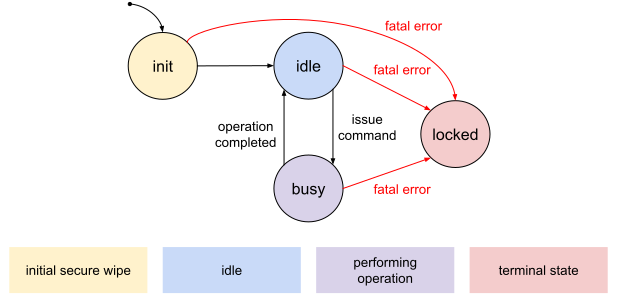
OTBN can be in different operational states.
After reset (init), OTBN performs a secure wipe of the internal state and then becomes idle.
OTBN is busy for as long it is performing an operation.
While executing an application, OTBN can become paused when executing the WFI instruction if this instruction is enabled in the CTRL register.
OTBN resumes the execution once the RESUME command is issued.
OTBN is locked if a fatal error was observed or after handling an RMA request.
The current operational state is reflected in the STATUS register.
- After reset, OTBN is busy with the internal secure wipe and the
STATUSregister is set toBUSY_SEC_WIPE_INT. - If OTBN is idle, the
STATUSregister is set toIDLE. - If OTBN is busy, the
STATUSregister is set to one of the values starting withBUSY_. - If OTBN gets paused by a
WFIinstruction, theSTATUSregister is set toPAUSED. - If OTBN is locked, the
STATUSregister is set toLOCKED.
OTBN transitions into the busy state as result of host software issuing a command; OTBN is then said to perform an operation.
OTBN transitions out of the busy state whenever the operation has completed or the execution gets paused.
In the STATUS register the different BUSY_* values represent the operation that is currently being performed.
A transition out of the busy state or entering the PAUSED state is signaled by the done interrupt (INTR_STATE.done).
When paused, issuing a RESUME command makes the OTBN continue with the next instruction.
The locked state is a terminal state; transitioning out of it requires an OTBN reset.
Operations and Commands
OTBN understands a set of commands to perform certain operations.
Commands are issued by writing to the CMD register.
The EXECUTE command starts the execution of the application contained in OTBN’s instruction memory.
The SEC_WIPE_DMEM command securely wipes the data memory.
The SEC_WIPE_IMEM command securely wipes the instruction memory.
The RESUME command resumes the execution after a WFI instruction.
Software Execution
Software execution on OTBN is triggered by host software by issuing the EXECUTE command.
The software then runs to completion, without the ability for host software to interrupt or inspect the execution.
- OTBN transitions into the busy state, and reflects this by setting
STATUStoBUSY_EXECUTE. - The internal randomness source, which provides random numbers to the
URNDCSR and WSR, is re-seeded from the EDN. - The instruction at address zero is fetched and executed.
- From this point on, all subsequent instructions are executed according to their semantics until either:
- A
WFIinstruction is executed (if enabled). In this case, the execution is paused and the DMEM is unlocked for the host. The execution must be resumed by the host by issuing theRESUMEcommand. There can be multiple pauses per execution and eachWFIinstruction issues thedoneinterrupt (INTR_STATE.done). - An
ECALLinstruction is executed, or an error is detected. This marks the end of the execution.
- A
- A secure wipe of internal state is performed.
- The
ERR_BITSregister is set to indicate either a successful execution (value0), or to indicate the error that was observed (a non-zero value). - OTBN transitions into the idle state (in case of a successful execution, or a recoverable error) or the locked state (in case of a fatal error).
This transition is signaled by raising the
doneinterrupt (INTR_STATE.done), and reflected in theSTATUSregister.
Errors
OTBN is able to detect a range of errors, which are classified as software errors or fatal errors. A software error is an error in the code that OTBN executes. In the absence of an attacker, these errors are due to a programmer’s mistake. A fatal error is typically the violation of a security property. All errors and their classification are listed in the List of Errors.
Whenever an error is detected, OTBN reacts locally, and informs the OpenTitan system about it by raising an alert. OTBN generally does not try to recover from errors itself, and provides no error handling support to code that runs on it.
OTBN gives host software the option to recover from some errors by restarting the operation.
All software errors are treated as recoverable, unless CTRL.software_errs_fatal is set, and are handled as described in the section Reaction to Recoverable Errors.
When CTRL.software_errs_fatal is set, software errors become fatal errors.
Fatal errors are treated as described in the section Reaction to Fatal Errors.
Reaction to Recoverable Errors
Recoverable errors can be the result of a programming error in OTBN software. Recoverable errors can only occur during the execution of software on OTBN, and not in other situations in which OTBN might be busy.
The following actions are taken when OTBN detects a recoverable error:
- The currently running operation is terminated, similar to the way an
ECALLinstruction is executed:- No more instructions are fetched or executed.
- A secure wipe of internal state is performed.
- The
ERR_BITSregister is set to a non-zero value that describes the error. - The current operation is marked as complete by setting
INTR_STATE.done. - The
STATUSregister is set toIDLE.
- A recoverable alert is raised.
The host software can start another operation on OTBN after a recoverable error was detected.
Reaction to Fatal Errors
Fatal errors are generally seen as a sign of an intrusion, resulting in more drastic measures to protect the secrets stored within OTBN. Fatal errors can occur at any time, even when an OTBN operation isn’t in progress.
The following actions are taken when OTBN detects a fatal error:
- A secure wipe of the data memory and a secure wipe of the instruction memory is initiated.
- If OTBN is not idle, then the currently running operation is terminated, similarly to how an operation ends after an
ECALLinstruction is executed:- No more instructions are fetched or executed.
- A secure wipe of internal state is performed.
- The
ERR_BITSregister is set to a non-zero value that describes the error. - The current operation is marked as complete by setting
INTR_STATE.done.
- The
STATUSregister is set toLOCKED. - A fatal alert is raised.
Note that OTBN can detect some errors even when it isn’t running.
One example of this is an error caused by an integrity error when reading or writing OTBN’s memories over the bus.
In this case, the ERR_BITS register will not change.
This avoids race conditions with the host processor’s error handling software.
However, every error that OTBN detects when it isn’t running is fatal.
This means that the cause will be reflected in FATAL_ALERT_CAUSE, as described below in Alerts.
This way, no alert is generated without setting an error code somewhere.
List of Errors
| Name | Class | Description |
|---|---|---|
BAD_DATA_ADDR |
software | A data memory access occurred with an out of bounds or unaligned access. |
BAD_INSN_ADDR |
software | An instruction memory access occurred with an out of bounds or unaligned access. |
CALL_STACK |
software | An instruction tried to pop from an empty call stack or push to a full call stack. |
ILLEGAL_INSN |
software | An illegal instruction was about to be executed. |
LOOP |
software | A loop stack-related error was detected. |
KEY_INVALID |
software |
An attempt to read a KEY_* WSR was detected, but no key was provided by the key manager.
|
MAI_SOFTWARE_ERROR |
software | An illegal SW interaction towards the MAI occurred. See the MAI error handling section. |
RND_REP_CHK_FAIL |
recoverable | The random number obtained from the last read of the RND register failed the repetition check. The RND EDN interface returned identical random numbers on two subsequent entropy requests. |
RND_FIPS_CHK_FAIL |
recoverable | The random number obtained from the last read of the RND register has been generated from entropy that at least partially failed the FIPS health checks in the entropy source. |
IMEM_INTG_VIOLATION |
fatal | Data read from the instruction memory failed the integrity checks. |
DMEM_INTG_VIOLATION |
fatal | Data read from the data memory failed the integrity checks. |
REG_INTG_VIOLATION |
fatal | Data read from a GPR or WDR failed the integrity checks. |
BUS_INTG_VIOLATION |
fatal | An incoming bus transaction failed the integrity checks. |
BAD_INTERNAL_STATE |
fatal | The internal state of OTBN has become corrupt. |
ILLEGAL_BUS_ACCESS |
fatal | A bus-accessible register or memory was accessed when not allowed. |
LIFECYCLE_ESCALATION |
fatal | A life cycle escalation request was received. |
FATAL_SOFTWARE |
fatal | A software error was seen and CTRL.software_errs_fatal was set. |
Alerts
An alert is a reaction to an error that OTBN detected. OTBN has two alerts, one recoverable and one fatal.
A recoverable alert is a one-time triggered alert caused by recoverable errors.
The error that caused the alert can be determined by reading the ERR_BITS register.
A fatal alert is a continuously triggered alert caused by fatal errors.
The error that caused the alert can be determined by reading the FATAL_ALERT_CAUSE register.
If OTBN was running, this value will also be reflected in the ERR_BITS register.
A fatal alert can only be cleared by resetting OTBN through the rst_ni line.
The host CPU can clear the ERR_BITS when OTBN is not running.
Writing any value to ERR_BITS clears this register to zero.
Write attempts while OTBN is running are ignored.
Reaction to Life Cycle Escalation Requests
OTBN receives and reacts to escalation signals from the life cycle controller.
An incoming life cycle escalation is a fatal error of type lifecycle_escalation and treated as described in the section Fatal Errors.
Idle
OTBN exposes a single-bit idle_o signal, intended to be used by the clock manager to clock-gate the block when it is not in use.
This signal is in the same clock domain as clk_i.
The idle_o signal is high when OTBN is idle, and low otherwise.
OTBN also exposes another version of the idle signal as idle_otp_o.
This works analogously, but is in the same clock domain as clk_otp_i.
TODO: Specify interactions between idle_o, idle_otp_o and the clock manager fully.
Data Integrity Protection
OTBN stores and operates on data (state) in its dedicated memories, register files, and internal registers. OTBN’s data integrity protection is designed to protect all data stored and transmitted within OTBN from modifications through physical attacks.
During transmission, the integrity of data is protected with an integrity protection code. Data at rest in the instruction and data memories is additionally scrambled.
In the following, the Integrity Protection Code and the scrambling algorithm are discussed, followed by their application to individual storage elements.
Integrity Protection Code
OTBN uses the same integrity protection code everywhere to provide overarching data protection without regular re-encoding. The code is applied to 32b data words, and produces 39b of encoded data.
The code used is an (39,32) Hsiao “single error correction, double error detection” (SECDED) error correction code (ECC) [CHEN08]. It has a minimum Hamming distance of four, resulting in the ability to detect at least three errors in a 32 bit word. The code is used for error detection only; no error correction is performed.
Memory Scrambling
Contents of OTBN’s instruction and data memories are scrambled while at rest. The data is bound to the address and scrambled before being stored in memory. The addresses are randomly remapped.
Note that data stored in other temporary memories within OTBN, including the register files, is not scrambled.
Scrambling is used to obfuscate the memory contents and to diffuse the data. Obfuscation makes passive probing more difficult, while diffusion makes active fault injection attacks more difficult.
The scrambling mechanism is described in detail in the section “Scrambling Primitive” of the SRAM Controller Technical Specification.
When OTBN comes out of reset, its memories have default scrambling keys. The host processor can request new keys for each memory by issuing a secure wipe of DMEM and a secure wipe of IMEM.
Actions on Integrity Errors
A fatal error is raised whenever a data integrity violation is detected, which results in an immediate stop of all processing and the issuing of a fatal alert.
Register File Integrity Protection
OTBN contains two register files: the 32b GPRs and the 256b WDRs. The data stored in both register files is protected with the Integrity Protection Code. Neither the register file contents nor register addresses are scrambled.
The GPRs x2 to x31 store a 32b data word together with the Integrity Protection Code, resulting in 39b of stored data.
(x0, the zero register, and x1, the call stack, require special treatment.)
Each 256b Wide Data Register (WDR) stores a 256b data word together with the Integrity Protection Code, resulting in 312b of stored data. The integrity protection is done separately for each of the eight 32b sub-words within a 256b word.
The register files can consume data protected with the Integrity Protection Code, or add it on demand. Whenever possible the Integrity Protection Code is preserved from its source and written directly to the register files without recalculation, in particular in the following cases:
- Data coming from the data memory (DMEM) through the load-store unit to a GPR or WDR.
- Data copied between WDRs using the
BN.MOVorBN.MOVRinstructions. - Data conditionally copied between WDRs using the
BN.SELinstruction. - Data copied between the
ACCandMODWSRs and a WDR. - Data copied between any of the
MOD0toMOD7CSRs and a GPR. (TODO: Not yet implemented.)
In all other cases the register files add the Integrity Protection Code to the incoming data before storing the data word.
The integrity protection bits are checked on every read from the register files, even if the integrity protection is not removed from the data.
Detected integrity violations in a register file raise a fatal reg_error.
Data Memory (DMEM) Integrity Protection
OTBN’s data memory is 256b wide, but allows for 32b word accesses. To facilitate such accesses, all integrity protection in the data memory is done on a 32b word granularity.
All data entering or leaving the data memory block is protected with the Integrity Protection Code; this code is not re-computed within the memory block.
Before being stored in SRAM, the data word with the attached Integrity Protection Code, as well as the address are scrambled according to the memory scrambling algorithm. The scrambling is reversed on a read.
The ephemeral memory scrambling key and the nonce are provided by the OTP block. They are set once when OTBN block is reset, and changed whenever a secure wipe of the data memory is performed. For example, see earlgrey’s OTP block.
The Integrity Protection Code is checked on every memory read, even though the code remains attached to the data.
A further check must be performed when the data is consumed.
Detected integrity violations in the data memory raise a fatal dmem_error.
Instruction Memory (IMEM) Integrity Protection
All data entering or leaving the instruction memory block is protected with the Integrity Protection Code; this code is not re-computed within the memory block.
Before being stored in SRAM, the instruction word with the attached Integrity Protection Code, as well as the address are scrambled according to the memory scrambling algorithm. The scrambling is reversed on a read.
The ephemeral memory scrambling key and the nonce are provided by the OTP block (for example, see earlgrey’s scrambling specification). They are set once when OTBN block is reset, and changed whenever a secure wipe of the instruction memory is performed.
The Integrity Protection Code is checked on every memory read, even though the code remains attached to the data.
A further check must be performed when the data is consumed.
Detected integrity violations in the data memory raise a fatal imem_error.
Memory Load Integrity
As well as the integrity protection discussed above for the memories and bus interface, OTBN has a second layer of integrity checking to allow a host processor to ensure that a program has been loaded correctly.
This is visible through the LOAD_CHECKSUM register.
The register exposes a cumulative CRC checksum which is updated on every write to either memory.
This is intended as a light-weight way to implement a more efficient “write and read back” check. It isn’t a cryptographically secure MAC, so cannot spot an attacker who can completely control the bus. However, in this case the attacker would be equally able to control responses from OTBN, so any such check could be subverted.
The CRC used is the 32-bit CRC-32-IEEE checksum.
This standard choice of generating polynomial makes it compatible with other tooling and libraries, such as the crc32 function in the python ‘binascii’ module and the crc instructions in the RISC-V bitmanip specification [SYMBIOTIC21].
The stream over which the checksum is computed is the stream of writes that have been seen since the last write to LOAD_CHECKSUM.
Each write is treated as a 48b value, {imem, idx, wdata}.
Here, imem is a single bit flag which is one for writes to IMEM and zero for writes to DMEM.
The idx value is the index of the word within the memory, zero-extended to 15b.
Finally, wdata is the 32b word that was written.
Writes that are less than 32b or not aligned on a 32b boundary are ignored and not factored into the CRC calculation.
The host processor can also write to the register.
Typically, this will be to clear the value to 32'h00000000, the traditional starting value for a 32-bit CRC.
Note the internal representation of the CRC is inverted from the register visible version.
This is done to maintain compatibility with existing CRC-32-IEEE tooling and libraries.
To use this functionality, the host processor should set LOAD_CHECKSUM to a known value (traditionally, 32'h00000000).
Next, it should write the program to be loaded to OTBN’s IMEM and DMEM over the bus.
Finally, it should read back the value of LOAD_CHECKSUM and compare it with an expected value.
Secure Wipe
Applications running on OTBN may store sensitive data in the internal registers or the memory. In order to prevent an untrusted application from reading any leftover data, OTBN provides the secure wipe operation. This operation can be applied to:
The three forms of secure wipe can be triggered in different ways.
A secure wipe of either the instruction or the data memory can be triggered from host software by issuing a SEC_WIPE_DMEM or SEC_WIPE_IMEM command.
A secure wipe of instruction memory, data memory, and all internal state is performed automatically when handling a fatal error.
In addition, it can be triggered by the Life Cycle Controller before RMA entry using the lc_rma_req/ack interface.
In both cases OTBN enters the locked state afterwards and needs to be reset.
A secure wipe of the internal state only is triggered automatically after reset and when OTBN ends the software execution, either successfully, or unsuccessfully due to a recoverable error.
If OTBN cannot complete a secure wipe of the internal state (e.g., due to failing to obtain the required randomness), it immediately becomes locked. In this case, OTBN must be reset and will then retry the secure wipe. The secure wipe after reset must succeed before OTBN can be used.
Data Memory (DMEM) Secure Wipe
The wiping is performed by securely replacing the memory scrambling key, making all data stored in the memory unusable. The key replacement is a two-step process:
- Overwrite the 128b key of the memory scrambling primitive with randomness from URND. This action takes a single cycle.
- Request new scrambling parameters from OTP. The request takes multiple cycles to complete.
Host software can initiate a data memory secure wipe by issuing the SEC_WIPE_DMEM command.
Instruction Memory (IMEM) Secure Wipe
The wiping is performed by securely replacing the memory scrambling key, making all instructions stored in the memory unusable. The key replacement is a two-step process:
- Overwrite the 128b key of the memory scrambling primitive with randomness from URND. This action takes a single cycle.
- Request new scrambling parameters from OTP. The request takes multiple cycles to complete.
Host software can initiate a data memory secure wipe by issuing the SEC_WIPE_IMEM command.
Internal State Secure Wipe
OTBN provides a mechanism to securely wipe all internal state, excluding the instruction and data memories.
The following state is wiped:
- Register files: GPRs and WDRs
- The accumulator register (also accessible through the ACC WSR) and the intermediate result registers for the Montgomery computation (hidden registers).
- Flags (accessible through the FG0, FG1, and FLAGS CSRs)
- The modulus (accessible through the MOD0 to MOD7 CSRs and the MOD WSR)
- The WSRs and CSRs for the KMAC interface.
- The WSRs and CSRs for the Masking Accelerator Interface.
The wiping procedure is a two-step process:
- Overwrite the state with randomness from URND and request a reseed of URND.
- Overwrite the state with randomness from reseeded URND.
Note that after internal secure wipe, the state of registers is undefined. In order to prevent mismatches between ISS and RTL, software needs to initialise a register with a full-word write before using its value.
Loop and call stack pointers are reset.
A secure wipe terminates any ongoing KMAC interface session. See the secure wipe section of the interface description. Any ongoing masking accelerator (MAI) operation ends regularly but all results are voided. See the secure wipe section of the MAI.
Host software cannot explicitly trigger an internal secure wipe; it is performed automatically after reset and at the end of an EXECUTE operation.
KMAC interface
The OTBN features an interface towards the KMAC HWIP which can be used to offload hashing operations. It consists of the following CSRs / WSRs:
KMAC_STATUSKMAC_CTRLKMAC_CFGKMAC_STRBKMAC_DATA_S0/KMAC_DATA_S1
Behind these CSRs/WSRs, which are described in more detail here, OTBN uses a dynamic application interface of the KMAC HWIP.
Before OTBN can make use of this interface, system SW must setup the KMAC HWIP correctly. See the KMAC HWIP documentation what must be configured before OTBN can use the interface.
OTBN software can control this interface by configuring it via KMAC_CFG and issuing commands via KMAC_CTRL.
These commands are then translated to dynamic application interface requests.
The responses from the interface are translated and exposed to OTBN SW via KMAC_STATUS and KMAC_DATA_S0 / KMAC_DATA_S1.
The interface supports multiple successive sessions where each session follows the following high-level steps:
- Check if the interface is ready by checking for
KMAC_STATUS.READY = 1. - Configure the desired hashing mode via
KMAC_CFG. - Start a session by issuing the
KMAC_CTRL.STARTcommand. - Send the message parts by issuing one or more
KMAC_CTRL.SENDcommands. - Issue the
KMAC_CTRL.PROCESScommand to process the full message. - Wait for the first response by polling until
KMAC_STATUS.RSP_VALID = 1. - Check for errors by reading
KMAC_STATUS.RSP_ERROR.- If there is an error, the session must be terminated, see error handling.
- Read the digest in 64-bit parts from
KMAC_DATA_S0andKMAC_DATA_S1. - For more digest data, poll again until
KMAC_STATUS.RSP_VALID = 1after reading both data WSRs. - Once the digest or the desired XOF output is read, end the digest reading phase by issuing a
KMAC_CTRL.DONEcommand. - Wait until the
KMAC_CTRL.DONEcommand has completed by polling untilKMAC_STATUS.RSP_VALID = 1. - Check for errors by reading
KMAC_STATUS.RSP_ERROR,KMAC_STATUS.MSG_WRITE_ERROR, andKMAC_STATUS.CTRL_ERROR.- If there is an error, the digest data must be considered as invalid.
- Issue the
KMAC_CTRL.CLOSEcommand to end the session.
Note that this high-level outline simplifies some steps, especially the error handling. If there is no error at the end, OTBN can start the next session with a new configuration and message. See the detailed explanations for the different steps in the next sections and the error handling section for more details.
Session details
This section elaborates on the previously presented high-level steps how to use the interface. The interface keeps track of the current session with the following state machine. Note, a command is issued by OTBN SW and a request/response refers to a KMAC HWIP application interface request/response which is generated/received by the OTBN-KMAC interface module. For simplicity, additional states to handle a secure wipe are not depicted.
stateDiagram-v2
[*] --> Idle

Idle --> Starting: START command

Starting --> WaitForMsg: Start request sent

WaitForMsg --> SendingMsg: SEND command
WaitForMsg --> Processing: PROCESS command

SendingMsg --> WaitForMsg: Message sent

Processing --> Receiving: PROCESS request sent

Receiving --> Terminating: DONE command

Terminating --> WaitForFinish: Termination request sent

WaitForFinish --> WaitForClose: Finish response received

WaitForClose --> Idle: CLOSE command
Starting a session
To start a session the OTBN SW has to:
- Poll until
KMAC_STATUS.READY = 1.- This should be 1 in most cases when OTBN starts executing a program, however, the interface could still be terminating a previous session due to a secure wipe (see secure wipe behaviour).
- Write the desired hashing configuration to
KMAC_CFG.- There is no validation when writing a configuration to
KMAC_CFGbut KMAC HWIP does check the configuration once the session is started. See error handling section for more details.
- There is no validation when writing a configuration to
- Issue the
KMAC_CTRL.STARTcommand by writing a 1 to it. - There may be no write to
KMAC_CFGuntilKMAC_STATUS.READYis 1 again (polled for before sending message).- Otherwise the configuration can be changed while the start request is being sent. The behaviour of the interface in this case is undefined.
- Writing
KMAC_CFGwhileKMAC_STATUS.READYis 0 setsKMAC_STATUS.MSG_WRITE_ERROR.
There is no immediate response indicating whether the session was started successfully or not.
This can be detected when sending the message or is reported along the first digest response: see error handling.
As such, after sending the KMAC_CTRL.START command OTBN SW must continue with sending the message.
Sending the message
Once the KMAC_CTRL.START command was issued, OTBN SW can send the message by following these steps:
- Poll until
KMAC_STATUS.READY = 1.- This can time out in certain error cases, see error handling.
- Write a message into
KMAC_DATA_S0andKMAC_DATA_S1(share 0 and 1, respectively) and set the corresponding strobe inKMAC_STRB.- All messages, including the last one, must be contiguous and LSB aligned.
- Only the last message may be partial.
- For an unmasked message, write the plaintext into one of the input WSRs and write zeros into the other one.
- Send the message by writing a 1 to
KMAC_CTRL.SEND. - Repeat these steps until the full message has been sent.
To end the message phase:
- Poll until
KMAC_STATUS.READY = 1. - Issue the
KMAC_CTRL.PROCESScommand by writing a 1 to it.
Retrieving digest data
Once the PROCESS command is issued, the KMAC HWIP starts hashing the message.
As soon as the first digest part is ready, the app interface automatically pushes it towards OTBN without any additional requests from OTBN.
After issuing the PROCESS command, OTBN software thus must do the following:
- Wait for the first response by polling until
KMAC_STATUS.RSP_VALID = 1. - Check
KMAC_STATUS.RSP_ERROR.- If 1, an error occurred and the app interface does not send any further responses.
- The session must be terminated as described in the error section.
- If there is no error, OTBN can read the first digest data (64-bit) from
KMAC_DATA_S0andKMAC_DATA_S1.- The digest data always comes in a shared representation.
To recover the plaintext digest the values read from
KMAC_DATA_S0andKMAC_DATA_S1must be XORed.
- The digest data always comes in a shared representation.
To recover the plaintext digest the values read from
- Once both WSRs,
KMAC_DATA_S0andKMAC_DATA_S1, have been read the interface clearsKMAC_STATUS.RSP_VALIDand the interface will accept the next digest part from the app interface. (i.e., theKMAC_STATUS.RSP_VALIDbit serves as back-pressure.) - Repeat the steps until the full digest or the required XOF output is received.
- As the
KMAC_STATUS.RSP_ERRORflag is sticky, subsequent checks can be postponed until the last element is read. - The first check is however essential as in case of an error no more responses arrive and polling
KMAC_STATUS.RSP_VALIDwould deadlock.
- As the
The number of digest parts pushed by the app interface depends on the selected mode, strength and XOF setting.
For SHA3 and KMAC, KMAC_CFG.EN_XOF must be 0 and the interface pushes only the SHA3 digest or the requested output length for KMAC.
The requested output length of KMAC is fixed by the KMAC HWIP to 384 bits.
For SHA3 it pushes roundup(digest_width / 64) responses.
For KMAC it pushes 384 / 64 = 6 responses.
Once these are pushed, the interface waits for a DONE command as explained below.
If the mode is SHAKE or cSHAKE, KMAC_CFG.EN_XOF controls whether the KMAC HWIP automatically issues RUN commands.
If KMAC_CFG.EN_XOF = 0, the KMAC HWIP pushes only the digest parts that make up the first rate.
Once these are pushed, the interface waits for a DONE command as explained below.
If KMAC_CFG.EN_XOF = 1, the KMAC HWIP pushes infinite responses.
For this it automatically squeezes more digest by issuing a KMAC HWIP internal squeeze command each time it finishes pushing one full rate.
As soon as the squeezing has finished, the app starts again to push the new rate towards OTBN.
When the OTBN software has received enough XOF output, the session can be terminated as explained below.
For SHAKE and cSHAKE the number of responses per rate depends on the strength and can be computed with (The StateWidth is defined by NIST FIPS-202 to be 1600):
#Responses = (StateWidth - 2 * Strength) / 64 = (1600 - 2 * Strength) / 64.
Optimizing the digest retrieval
The KMAC hashing operation is fully deterministic and thus the polling until KMAC_STATUS.RSP_VALID = 1 can be optimized.
The first polling after issuing the PROCESS command is required as it is unknown when exactly the first response arrives (error response arrives earlier than the first digest).
However, once the first response has arrived, the arrival of the subsequent responses is fully deterministic.
The KMAC HWIP pushes the full rate back to back and the squeezing is also a deterministic operation.
On the OTBN interface side, each time both shares are read, the next digest is accepted by the interface in the same cycle (assuming the KMAC HWIP is currently pushing digest data).
This allows OTBN SW to read the digest responses back to back, exploiting the full bandwidth the KMAC provides.
Ending a session
A session must always be ended with the DONE command followed by a CLOSE command, regardless of whether an error was detected during the message or digest phase.
This is required to bring the KMAC HWIP back to idle so that the next session can begin or in case of an error to release the interface so that system SW then can handle the KMAC HWIP error (see KMAC HWIP documentation how errors must be handled).
To end a session:
- Issue the
KMAC_CTRL.DONEcommand by writing a 1 it.KMAC_STATUS.RSP_VALIDis cleared immediately upon issuingDONE, even if the current values inKMAC_DATA_S0/KMAC_DATA_S1have not been read yet.
- Poll until
KMAC_STATUS.RSP_VALID = 1.- This final response acknowledges the end of the session.
- Check the error flags (see error handling for more details):
KMAC_STATUS.RSP_ERRORKMAC_STATUS.MSG_WRITE_ERRORKMAC_STATUS.CTRL_ERROR
- Once the errors have been checked, issue the
KMAC_CTRL.CLOSEcommand to end the session.- This will clear all error flags.
If there has been no error detected, the digest from this session is valid and the interface is ready to start the next session.
KMAC interface error handling
The possible errors during a session can be separated between KMAC related errors and OTBN SW errors.
The OTBN SW related errors are:
KMAC_STATUS.MSG_WRITE_ERROR- OTBN SW wrote to
KMAC_DATA_S0/KMAC_DATA_S1,KMAC_STRBorKMAC_CFGwhen the interface was not ready to accept new data or a new configuration, i.e, whenKMAC_STATUS.READY = 0. - OTBN SW wrote to
KMAC_DATA_S0/KMAC_DATA_S1in the same cycle the interface wrote an incoming digest response into them during the receive phase (even thoughKMAC_STATUS.READY = 1). The digest response has priority, so the SW write to the least significant word is ignored. - In this case the configuration / message sent to KMAC HWIP could be corrupted and any digest must be considered invalid.
- OTBN SW wrote to
KMAC_STATUS.CTRL_ERROR- OTBN SW issued an unexpected command sometime during the session.
- As any unexpected commands are ignored the digest data is still valid. However, it gives a hint for a programming error or that OTBN was attacked during the session.
The KMAC related errors cases are:
KMAC_STATUS.READYremains low after issuing theKMAC_CTRL.STARTor aKMAC_CTRL.SENDcommand:- The KMAC HWIP does not accept the session request because:
- It is busy serving another request.
- Note, if the request channel is pipelined, the timeout can happen as soon as the pipeline is full, i.e., after sending the first few messages.
- It is in a terminal error state.
- It is busy serving another request.
- The KMAC HWIP does not accept the session request because:
- A digest response has
KMAC_STATUS.RSP_ERROR = 1. This happens if either:- The session request is rejected because:
- The requested hashing configuration is invalid.
- System SW did not set
CFG_SHADOWED.entropy_readyof the KMAC HWIP before OTBN SW is started. - This service rejected error is reported with the first response after the
KMAC_CTRL.PROCESScommand.
- A KMAC HWIP internal error occurred during the session.
- Can occur at any time when receiving digest data.
- See the KMAC HWIP documentation for error causes.
- The session request is rejected because:
In case the KMAC_STATUS.READY remains low, the KMAC must be assumed as locked up and OTBN SW must abort the execution.
If OTBN aborts its execution, the system SW then must take the required steps to recover the KMAC HWIP.
See also the section explaining the secure wipe behaviour.
If a service rejected error or the KMAC HWIP internal error occurs, all digest data must be considered as invalid. OTBN SW then must end the session. For this OTBN SW should:
- Clear the
KMAC_STATUS.RSP_ERRORbit (W1C). - Issue the
KMAC_CTRL.DONEcommand. - Poll until
KMAC_STATUS.RSP_VALID = 1. - Check the
KMAC_STATUS.RSP_ERRORbit- If it is set again, this means the KMAC HWIP experienced an internal error and this cannot be handled from the OTBN side.
- If it is 0, a service rejected error occurred and OTBN can try again with a new session (e.g., with a valid configuration).
- In any case, issue the
KMAC_CTRL.CLOSEcommand to end the session.
KMAC interface secure wipe behaviour
When a secure wipe starts, the behaviour depends on whether a session is ongoing or not.
If no session is ongoing, then:
KMAC_DATA_S0/KMAC_DATA_S1are overwritten with randomness twice like any other WSR (regular secure wipe behaviour).KMAC_CFGandKMAC_STRBare reset to their default values.- All flags in
KMAC_STATUSare cleared.
If a session is ongoing, then:
KMAC_DATA_S0/KMAC_DATA_S1are overwritten with randomness twice like any other WSR (regular secure wipe behaviour).- The
KMAC_STATUS.READYis immediately cleared to 0. - The interface starts immediately to end the session in a graceful way.
- A message beat that is already being sent is completed (its request
validstays asserted until the beat is accepted), but no further beats are sent. - If the session is still in the message phase, a
PROCESSrequest is sent. - If required a termination request is sent, and any digest responses that still arrive are discarded until the finish response is received.
- A message beat that is already being sent is completed (its request
- Once the session has been ended,
KMAC_CFGandKMAC_STRBare reset to their default values and all flags inKMAC_STATUSare cleared. - Once no secure wipe is ongoing anymore,
KMAC_STATUS.READYreturns back to 1.
Because the data WSRs are wiped immediately, a wipe that coincides with an in-flight message beat can change that beat’s data while its request valid is asserted.
This would violate the valid locked-in principle and leads to undefined digest data.
However, this is a rare corner case and is deliberately accepted because in this case any produced digest data will get discarded.
Terminating the session requires the KMAC HWIP to accept the requests.
If the KMAC HWIP never does this, the termination could take arbitrarily long.
A secure wipe can therefore finish before the session is terminated, after which OTBN returns to its idle state (or locks up in the error case).
It would then be possible for system SW to start another OTBN program before the previous program’s session has been terminated.
Therefore, any OTBN program must check for KMAC_STATUS.READY = 1 before starting a session.
If a further secure wipe occurs before the termination completes, the KMAC_DATA_S0 / KMAC_DATA_S1 WSRs are wiped again while the termination process continues unaffected.
Masking accelerator interface
OTBN features a masking accelerator interface (MAI) which is based on CSRs/WSRs and connects to the masking accelerator (MA). This MA implements a collection of core functions in hardware which are particularly useful when implementing masking countermeasures for hardening OTBN applications against SCA, and which themselves are challenging to harden against SCA. Internally, the MA uses a heavily pipelined first-order masking countermeasure combined with shuffling to deter SCA. The masking countermeasure is formally verified under the transition- and glitch-extended probing model. For details, refer to our CocoAlma and PROLEAD verification setups.
The OTBN SW can control this accelerator through the following CSRs / WSRs (see here for more details):
MAI_CTRLMAI_STATUSMAI_RES_S0MAI_RES_S1MAI_IN0_S0MAI_IN0_S1MAI_IN1_S0MAI_IN1_S1
The MAI_CTRL and MAI_STATUS CSRs allow OTBN software to configure and start operations.
All other WSRs are used either to load data into or retrieve results from the accelerator.
These WSRs are 256-bit wide and are interpreted by the MAI as 8 first-order shared 32-bit elements the same way as the vectorized instructions operate on WDRs.
The _Sx suffix identifies the share index.
The accelerator supports the following vectorized operations:
- secAdd
- Securely computes arithmetic additions of two Boolean shared operands and presents the results again as Boolean sharings.
MAI_IN0_S0/MAI_IN0_S1carry Boolean sharings(a0, a1)ofa, wherea = a0 XOR a1.MAI_IN1_S0/MAI_IN1_S1carry Boolean sharings(b0, b1)ofb, whereb = b0 XOR b1.MAI_RES_S0/MAI_RES_S1will hold Boolean sharings(c0, c1)ofc, wherec = c0 XOR c1 = (a + b) mod 2^32.- Processing the full vector takes 14 cycles. The first result is written to the output WSRs after 7 cycles.
- secAddMod
- Similar to the secAdd operation but the addition is performed modulo a configurable modulus.
The modulus is taken from bits 31:0 of the MOD WSR hereinafter referred to as
MOD. - Let
inp1andinp2be the true unmasked operands withinp1 + inp2 < MOD. MAI_IN0_S0/MAI_IN0_S1andMAI_IN1_S0/MAI_IN1_S1carry Boolean sharings(a0, a1),(b0, b1)ofinp1/inp2such thata + b = inp1 + inp2 + (2^32 - MOD).- This means that the two’s-complement negation of
MODmust be absorbed into the XOR-sums. MAI_RES_S0/MAI_RES_S1will hold Boolean sharings of(inp1 + inp2) mod MOD.- Processing the full vector takes 22 cycles. The first result is written to the output WSRs after 15 cycles.
- Similar to the secAdd operation but the addition is performed modulo a configurable modulus.
The modulus is taken from bits 31:0 of the MOD WSR hereinafter referred to as
- A2B
- Convert values represented with an Arithmetic sharing to a Boolean shared representation.
MAI_IN0_S0/MAI_IN0_S1carry Arithmetic sharings(a0, a1)ofa, wherea = a0 + a1 mod MOD.MAI_IN1_S0/MAI_IN1_S1are unused.MAI_RES_S0/MAI_RES_S1will hold Boolean sharings(b0, b1)ofa, whereb0 XOR b1 = a.- Processing the full vector takes 22 cycles. The first result is written to the output WSRs after 15 cycles.
- B2A
- Convert values represented with a Boolean sharing to an Arithmetic shared representation.
MAI_IN0_S0/MAI_IN0_S1carry Boolean sharings(a0, a1)ofa, wherea = a0 XOR a1.MAI_IN1_S0/MAI_IN1_S1are unused.MAI_RES_S0/MAI_RES_S1will hold arithmetic sharings(b0, b1)ofa, whereb0 + b1 mod MOD = a.- Internally, there is a rejection-sampling step for each element. This sampling makes the execution nondeterministic. If no samples must be rejected, processing the full vector would take 23 cycles. The first result would be written to the output WSRs after 16 cycles.
For all operations except the secAdd, the MOD WSR must stay constant as long as an execution is ongoing. Otherwise the results are invalid.
MAI usage
OTBN SW can perform a masking operation by following these steps (see also illustration below):
- Poll until
MAI_STATUS.BUSY = 0. - Write the input data to the input WSRs
MAI_INx_Sy(wherexrepresents the input,ythe share index). - Write the desired operation type to
MAI_CTRL.OPERATION.- This step can also come before the data is transferred or be combined with the
STARTcommand.
- This step can also come before the data is transferred or be combined with the
- Issue the
MAI_CTRL.STARTcommand by writing a 1 to it.- The MAI will then start to push all 8 elements of the input WSRs sequentially into the masking accelerator.
- As soon as the first result is available, the MAI will begin to overwrite the
MAI_RES_S0/MAI_RES_S1WSRs with the new data. MAI_CTRL.OPERATIONand any input data may not be changed as long asMAI_STATUS.BUSY = 1. Otherwise a SW error occurs, see below.
- Poll until
MAI_STATUS.BUSY = 0. - Read back the results from
MAI_RES_S0/MAI_RES_S1. - Repeat this sequence for the next data.
This sequence can be optimized, because:
- The input WSRs can be overwritten with the next data as soon as the MAI pushed all elements into the accelerator.
- This is the case as soon as
MAI_STATUS.INPUT_READY = 1. - Note that
MAI_STATUS.INPUT_READY = 1does not signal that the MAI is ready to start the next execution. It just indicates that it is ready to receive new data.
- This is the case as soon as
- The START command of the next execution can be issued before the results are read back.
- This is possible because the accelerator latency delays the update to the result WSRs. See operation details for exact latency numbers.
- The START command can be issued as soon as
MAI_STATUS.BUSY = 0.
This allows overlapping data transfers with the accelerator latency. The overlapping execution software flow is:
- Setup the MAI as described above.
- Start the first execution by issuing the
MAI_CTRL.STARTcommand. - Poll until
MAI_STATUS.INPUT_READY = 1. - Update the
MAI_INx_Sywith the next data. - Poll until
MAI_STATUS.BUSY = 0. - Issue the
MAI_CTRL.STARTcommand for the next execution. - Read back the result of the first execution.
- Repeat the steps starting with “Poll until
MAI_STATUS.INPUT_READY = 1”.
This procedure can be even further optimized for secAdd, secAddMod, and A2B because their latency is deterministic and thus the polling can be replaced with the correct number of other instructions.
It is only possible to overlap executions of the same type / configuration as MAI_CTRL.OPERATION must remain constant as long as MAI_STATUS.BUSY = 1.
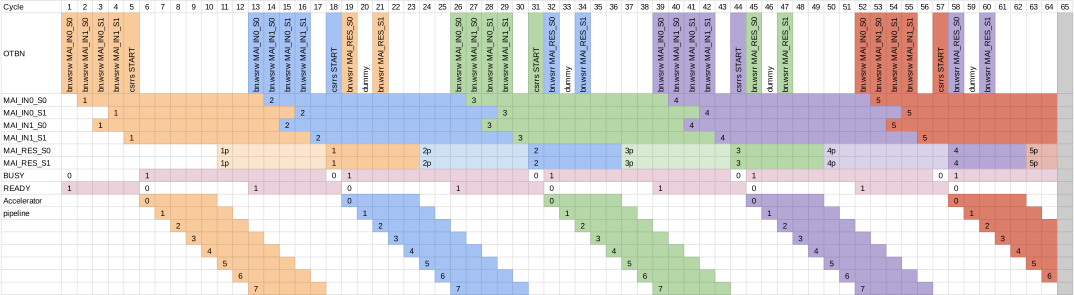
The following image depicts the flow for multiple secAdd executions without any memory operations (to load data from/to WDRs / DMEM).
A result with “1p” means that this WSR contains partial results (vector elements) / is being overwritten with results from the current conversion (2p for results of the second conversion, etc).
The dummy instruction between the two bn.wsrr instructions is to avoid leakage when reading the two shares of the results.
In the example, the latency of the secAdd accelerator is assumed to be 5 cycles. The unused cycles can be used by OTBN to do other tasks like loading the next inputs.
MAI error handling
An erroneous use of the MAI will result in a MAI_SOFTWARE_ERROR.
This will trigger an abortion of the OTBN execution with a secure wipe.
The MAI_SOFTWARE_ERROR is triggered when:
MAI_CTRL.OPERATIONcontains an invalid selection when theMAI_CTRL.STARTbit is set.- The
MAI_CTRL.STARTbit is set orMAI_CTRL.OPERATIONis written to whilstMAI_STATUS.BUSY = 1. - A write to input WSRs is detected whilst
MAI_STATUS.INPUT_READY = 0.- The
MAI_INx_Syregisters are used as input buffers. Modifying the register content can lead to unexpected results.
- The
- A write to the reserved section of
MAI_CTRLis detected.- Note that the MOD WSR must also remain constant but this is not checked for in HW.
A write to the output WSRs whilst an operation is ongoing is on purpose not handled as an error. This allows clearing the output WSRs between two overlapping operations if this would be required for security reasons. It is the SW’s responsibility to make sure not to overwrite results.
MAI secure wipe behaviour
When a secure wipe starts, any ongoing execution is allowed finishing. This means that the MAI still dispatches the input values into the accelerator but any result is discarded. To make the duration deterministic, the rejection sampling for B2A is disabled during a secure wipe.
There is no special handling for the WSRs or CSRs. The WSRs are cleared with randomness and the CSRs are reset to their default values.
Letting the MAI end the execution is fine because the highest execution latency is 23 cycles. The secure wipe however only clears the WSRs and CSRs after at least 32 cycles (after URND reseeding and clearing GPRs / WDRs). Therefore it is ensured that any ongoing execution has a constant configuration and input data.
References
[CHEN08] L. Chen, “Hsiao-Code Check Matrices and Recursively Balanced Matrices,” arXiv:0803.1217 [cs], Mar. 2008 [Online]. Available: https://arxiv.org/abs/0803.1217
[SYMBIOTIC21] RISC-V Bitmanip Extension v0.93 Available: https://github.com/riscv/riscv-bitmanip/releases/download/v0.93/bitmanip-0.93.pdf